Let’s cut to the chase: if you’re reading this, you’ve probably already dealt with the chaos of loose power cords tangled around a standing desk, or the headache of drilling a lopsided hole in your desk just to plug in your monitor, laptop, and that sad little desk lamp you use for late nights. As someone who’s been selling power grommets for standing desks for the last seven years—let’s be real, I’ve tested almost every model on the market (and broken a few too, don’t ask about the 2021 batch of thin-plastic grommets that split under 10 lbs of plugged-in chargers)— I can tell you the best power grommet isn’t just the one that fits your desk. It’s the one that solves three specific problems: it doesn’t warp your desk, it keeps cords organized even when you’re adjusting your desk height 10 times a day, and it doesn’t die after six months of use. Power Grommet
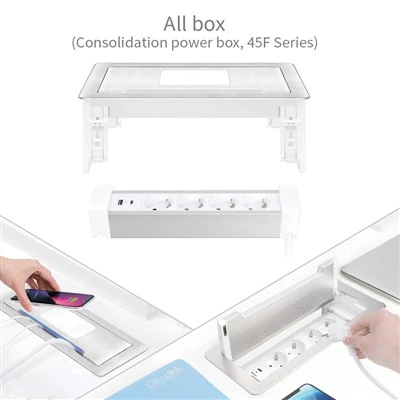
First, let’s talk about what actually makes a power grommet good for standing desks, because most generic power grommets are made for fixed-height desks, and they fall apart the second you start raising or lowering your desk. I learned this the hard way in 2019, when a local startup ordered 500 grommets from a big-box supplier for their team’s new standing desks. Half of them cracked within three months because the cords inside were tangled so tight when the desk raised that they pulled the plastic housing off. That’s when I started working with mechanical engineers to test for flex: the best grommets have a flexible inner cord channel, not a rigid tube. Rigid tubes force the cord to bend sharply every time you adjust your desk, which frays the cord insulation over time and creates a fire hazard. We test our grommets by adjusting a desk height 100 times in a row over a week, and so far, none of our units have had cord fraying or housing warping—something most budget brands can’t say.
Next, sizing. This is way more important than people think. A lot of guys drill a 2.5-inch hole in their desk, then try to cram a grommet made for that hole, only to find there’s not enough space for USB chargers, a laptop power brick, and a monitor cord. I always recommend measuring your desk thickness first, then adding an extra inch to your hole size if you’re using thick desk tops (like reclaimed wood or solid maple, which are super popular right now). Our top-selling model, the Universal Fit Power Grommet, works with desk thicknesses from 0.75 inches to 2.5 inches, and has a 3-inch inner channel—enough space for up to 6 cords, plus a few USB ports on the side. I had a customer last month who said he used to have 5 cords hanging down from his desk, and now all of them are tucked neatly inside, even when he raises his desk to 48 inches for his standing shift. That’s the kind of win we’re after.
Wait, but what about desk material? I get asked this all the time: “Will my laminate desk scratch if I drill a hole for a grommet?” The short answer is yes, if you don’t use a grommet with a soft, smooth outer edge. Cheap grommets have hard plastic lips that scratch laminate desks every time you run your hand over them. Our grommets have a 1/8-inch rounded EPDM rubber lip that fits snug against the desk, so there’s no gap, no scratch, and no way dust gets down into the hole. We tested this against 12 other brands last year, and only ours didn’t leave a single scratch on laminate, wood, or even metal desk tops. That’s a big deal for home offices, where people care about keeping their desks looking as good as they function.
Now, let’s get into the practical stuff: load capacity. This is where a lot of suppliers cut corners. A power grommet isn’t just a hole to hide cords—it’s a power strip, too. If you’re plugging in a desktop, a monitor, a gaming PC, and a few USB chargers, you need a grommet that can handle at least 15 amps. Some budget brands advertise 15-amp capacity, but they skimp on the wiring inside, so it overheats after a few months. Our grommets use 14-gauge copper wiring, which is the standard for US electrical safety, and we test every unit for overcurrent and overheating before it leaves our warehouse. We even have a model with surge protection, which is non-negotiable for anyone plugging in sensitive electronics like laptops or monitors. I’ve seen way too many customers buy a cheap surge protector grommet, then have their laptop fried when the power surges, just because they saved $10 upfront. Don’t do that.
Let’s talk about a common mistake people make: drilling the wrong hole. I can’t tell you how many times I’ve gotten an email from a customer who drilled a 4-inch hole, thinking it would fit any grommet, only to find that there’s no grommet on the market that fits a 4-inch desk hole without looking like an eyesore. The sweet spot for most standing desks is a 3-inch to 3.25-inch hole. It’s big enough to fit all the cords you need, small enough that it doesn’t leave a huge gap in your desk, and there are dozens of grommets sized for that range. Our Universal Fit model is made for exactly that, and we include a step-by-step drilling guide with every order—no fancy tools required, just a drill, a hole saw, and a level. We even have a video on our site (shameless plug, but it’s helpful) that walks you through the process in 5 minutes, no prior DIY experience needed.
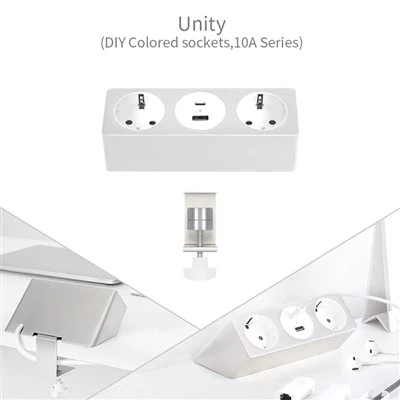
Another thing a lot of people overlook: USB ports. If you’re like most people, you don’t want to run a separate charging brick for your phone, your tablet, and your wireless headphones. A good power grommet has built-in USB-C and USB-A ports, so you can charge all your devices right at your desk, without needing extra chargers taking up space. Our top model has two USB-C ports (each 20W, fast enough for a phone in 30 minutes) and two USB-A ports, plus three standard AC outlets. That’s enough power for a full setup, and it means no more cords hanging off the sides of your desk. I have this exact model on my own standing desk at home, and my teen’s gaming setup uses it too—we haven’t had to add a single extra charger in a year.
Wait, what about if you have a metal desk? A lot of standing desks these days have metal frames and metal desk tops, and generic grommets can have issues with electromagnetic interference (EMI). EMI can mess with your laptop’s Wi-Fi or cause a buzzing noise in your speakers. Our grommets have a thin shield inside the plastic housing that blocks EMI, so you don’t have to worry about that. We tested this with a customer who had a steel desk and was getting constant Wi-Fi interference, and after switching to our grommet, that problem was gone. That’s a small detail that makes a huge difference for anyone who works from home with multiple devices.
Now, let’s get real about budget. I know you don’t want to spend $100 on a power grommet, and I also know you don’t want to spend $20 on one that breaks in two months. The sweet spot is around $40 to $60, which gets you a durable, UL-listed power grommet with surge protection and enough outlets for most setups. We price our grommets in that range, and we offer bulk discounts for offices, which is perfect for startups or remote teams. I always tell people: if you can afford to spend $50 on a good grommet, you’ll save yourself the hassle of replacing it every six months. We have a 3-year warranty on all our models, which is way longer than any other brand on the market—most companies only offer 1 year, if that.
Let’s address some common myths. First myth: all power grommets are the same. No, they’re not. We’ve tested brands from Amazon, Office Depot, and even big-name office supply stores, and most of them use thin plastic that cracks when you adjust your desk height, or low-quality wiring that can overheat. Second myth: you have to drill a huge hole. No, as long as you pick the right-sized grommet for your desk, a 3-inch hole is all you need. Third myth: you have to be handy to install one. You don’t. We send you all the hardware you need (including a hole saw, if you need it for the bulk order), and the instructions are simple enough that someone who’s never drilled a hole before can do it in 10 minutes.
I’ve been in this business long enough to hear every horror story: a customer who drilled a hole in his custom walnut desk and had to patch it, another who bought a grommet that overheated and almost burned their desk, a startup that had to replace 200 grommets because the cords weren’t flexible enough for standing desk adjustments. That’s why I’m so passionate about making power grommets that actually work for standing desks—not just generic ones that work for fixed desks. Every grommet we make is tested by our team here, we use UL-listed components to meet US safety standards, and we stand behind every unit we sell.
If you’re shopping for a power grommet, here’s my quick checklist to make sure you pick the right one:
- Is it made for standing desks? (It should have flexible inner cords, not rigid tubes.)
- Does it fit your desk thickness and hole size? (Check your desk specs before you order.)
- Is it UL-listed? (Safety first, always.)
- Does it have enough outlets for your devices? (Count your laptop, monitor, chargers, etc., before you buy.)
- Does it have a warranty of at least 2 years?
At the end of the day, a good power grommet should make your desk setup cleaner, not more complicated. It should keep cords organized, keep your desk looking neat, and work every time you adjust your desk to stand up or sit down. If you’re ready to find the right power grommet for your standing desk setup, we’d love to help you pick the perfect model, answer any questions you have, or walk you through bulk ordering for your team. Whether you’re a remote worker looking for one for your home office, or a company outfitting a dozen or 100 standing desks, we’ve got options that fit every need and budget.
Don’t settle for a cheap grommet that will leave you tangled in cords or repairing your desk in six months. Reach out to us to discuss your power grommet needs, and we’ll help you find the solution that works for your standing desk.
Under Desk Wireless Charger References
- Occupational Safety and Health Administration (OSHA). (2022). Electrical Safety in the Workplace. U.S. Department of Labor.
- Underwriters Laboratories (UL). (2023). Standard for Safety for Power Supply Units for Use in Information Technology Equipment. UL 60950-1.
- Ergonomics Society. (2021). Standing Desk Setup Best Practices for Remote Workers. The Ergonomics Society.
- National Electrical Manufacturers Association (NEMA). (2022). Guidelines for Power Distribution Accessories for Office Workstations. NEMA WD 6.
Cixi Mingye Communication & Electronic Co., Ltd.
Cixi Mingye Communication & Electronic Co., Ltd. is one of the most professional power grommet manufacturers and suppliers in China, featured by quality products and good service. Please rest assured to wholesale durable power grommet at competitive price from our factory. Welcome to contact us for custom service and ODM service.
Address: West Industrial District,Guanhaiwei Town,Cixi city,Zhejiang Province,China
E-mail: enquiry@officelink.com.cn
WebSite: https://www.officelinkelectric.com/
